| Lesson 2 | The find command |
| Objective | Use find to identify files from within a script. |
Unix find Command
The
find command locates files based on characteristics such as the file name or type of file.
You can use find when you cannot remember where you stored a file. The following displays the find command.
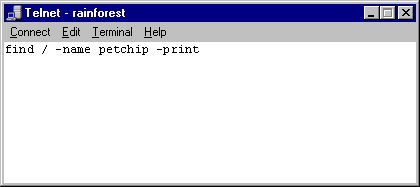
The command above searches for files named petchip on the system. Since we start in the root directory, this searches the whole machine.
The above command will search every directory on your disk drives, and makes the disk drives work hard.
You may need to wait several minutes for the command to complete. This can be frustrating, so start your search in a directory other than root if possible. The next example starts in the /tmp directory instead of the root directory.
You may need to wait several minutes for the command to complete. This can be frustrating, so start your search in a directory other than root if possible. The next example starts in the /tmp directory instead of the root directory.
The –type and –user options
To locate a file by owner or file type, use the following command:find /tmp -type f –user jane –print
Starting in the /tmp directory, this command searches for files that are type f (regular files as opposed to directory files) and owned by the user called jane. When the files are found they are printed onto the computer screen.
Here is a review of some common file types.
Here is a review of some common file types.
Common Unix File Types
In UNIX, files are divided into categories called types. The most common available file types are:
Type f files contain a program or text and are created with an editor such as vi or a compiler such as cc. The file named “letter” in your shell account is an example of a regular file. If you use the
The dash indicates this is a regular file.
When searching for a regular file using the
Type d files are directories, which are folders that contain other files. The course-project file in your shell account is an example of a directory file. Use the
When searching for a directory file using the
- f : regular files
- d : directory files
Type f files contain a program or text and are created with an editor such as vi or a compiler such as cc. The file named “letter” in your shell account is an example of a regular file. If you use the
ls –1 command to show a full listing of the file named “letter,”
you will see a dash as the very first character of the output.
The dash indicates this is a regular file.
When searching for a regular file using the
find command, use the –type f option.Type d files are directories, which are folders that contain other files. The course-project file in your shell account is an example of a directory file. Use the
–ld option with the ls command to show a full listing of the course-project directory file.
A d is the very first character of the output, which indicates that this is a directory file, as shown in the examples below:When searching for a directory file using the
find command, use the –type d option.
UNIX File Types
The two most common file types are regular files and directories. Regular files are by far the most common type of files in a UNIX system, with program source, documents, executable programs, and scripts all being stored as regular files. One could argue that executable files are a special type of regular file but their handling by the filesystem is just the same, that is, the file contains a stream of bytes that the filesystem never needs to interpret.
Directories are different however. Although they also contain a stream of bytes, filesystems interpret these bytes in a manner that allows users to see which files are present in the directory and how they are linked together from a hierarchical perspective. There are other file types which must be considered by programmers and administrators.
Directories are different however. Although they also contain a stream of bytes, filesystems interpret these bytes in a manner that allows users to see which files are present in the directory and how they are linked together from a hierarchical perspective. There are other file types which must be considered by programmers and administrators.
Different Unix Files Types
- Regular files. As mentioned above, regular files hold data that is not interpreted by the filesystem, such as program source and binaries, documents and scripts. Directories. Directories are used to provide structure within a filesystem. Directories can index files of any type including other directories. Symbolic links. A symbolic link, also called a symlink, is a means by which one file can refer to another file through use of a different name. Symbolic links can cross filesystem boundaries. Removing a symbolic link has no impact on the file it references.
- Hard links. Whereas a symbolic name is simply a mapping between one file name and another with no impact on the referenced file, a hard link actually refers to the same physical storage as the file to which it references. Thus by creating a hard link, the file's link count is incremented. When the hard link is removed the link count is decremented. When the link count reaches zero, the file is removed. Hard links cannot cross filesystem boundaries.
- Named pipes. A named pipe is a bi-directional IPC (Inter Process Communication) mechanism that allows unrelated processes to communicate. This differs from traditional UNIX pipes that can only be accessed by related processes.
- Special files. A special file is a file that refers to a device such as a disk or tape. To access a device, the caller would open the special file and access it just like any other file.
- Xenix special file. Semaphores and shared memory segments in the Xenix operating system could be managed through the UNIX namespace. A special file of zero length could be used to represent a semaphore or a shared memory segment. There were a host of Xenix specific functions available for management of these IPC mechanisms. None of the calls were part of any standard and therefore will not be discussed further.
The next lesson shows how to use the
wc command to count the words, lines, and characters in a file.
