| Lesson 3 | What is a process? |
| Objective | Define a UNIX process |
Define Unix Process
Unix Process: A process is an executing or running instance of a program and processes are also frequently referred to as tasks.
In the context of UNIX shell programming, a process refers to an instance of a program that is currently executing. It's like a running container where the program's instructions are being carried out. Here's a breakdown of key aspects of processes in shell programming:
Here's an analogy: Imagine you're in a kitchen (the operating system) and decide to bake a cake (the program). You preheat the oven (process creation), gather ingredients (resource allocation), follow the recipe steps (program instructions), and finally take out the cake (process termination). Each cake you bake in this kitchen would be a separate process. Understanding processes is fundamental for shell programming as it allows you to:
By effectively working with processes, you can write more powerful and versatile shell scripts for various automation tasks in the UNIX environment.
- Execution: When you execute a program (like a shell script or a compiled binary) in the terminal, the operating system creates a new process for it. This process has its own memory space, CPU time allocation, and resources to manage the program's execution.
- Process Lifetime: A process goes through a lifecycle from creation to termination. It starts with initialization, then goes through execution, and finally exits with a status code indicating success or failure.
- Process ID (PID): The operating system assigns a unique identifier (PID) to each process. This PID helps identify and manage individual processes. You can use the `ps` command to list running processes and their PIDs.
- Foreground vs. Background: Processes can run in the foreground or background. Foreground processes have your terminal's attention and wait for user input before continuing. Background processes run in the background without requiring immediate user interaction. You can send background processes to the background using the `&` symbol after the command or the `bg` command.
- Shell Scripts and Processes: Shell scripts are essentially a series of commands written in a scripting language like bash. When you execute a shell script, the shell creates a new process to interpret and execute the commands in the script one by one.
Here's an analogy: Imagine you're in a kitchen (the operating system) and decide to bake a cake (the program). You preheat the oven (process creation), gather ingredients (resource allocation), follow the recipe steps (program instructions), and finally take out the cake (process termination). Each cake you bake in this kitchen would be a separate process. Understanding processes is fundamental for shell programming as it allows you to:
- Control process execution: You can launch programs, wait for them to finish, and check their exit status within your shell scripts.
- Manage background tasks: You can run long-running tasks in the background without blocking your terminal.
- Automate workflows: You can chain multiple commands together in a script, effectively creating new processes for each command execution.
By effectively working with processes, you can write more powerful and versatile shell scripts for various automation tasks in the UNIX environment.
Difference between Process and Program
The definition of a process depends on the difference between a process and a program.
A program is a static entity, a file that resides on the disk. An example is the
you use to list files in the current directory. When you run a program, you create a process. In other words, a process is a running. If five users run the
When you login to your shell account, UNIX starts a shell process for you.
A program is a static entity, a file that resides on the disk. An example is the
/bin/ls program
you use to list files in the current directory. When you run a program, you create a process. In other words, a process is a running. If five users run the
ls command, they create five processes. A process is an active entity in the memory and CPU of your machine. UNIX assigns a unique number to each process called a PID number.
- Do these number assignments only last as long as the process is running?
- Once a process is done running, does it no longer exist?
- In other words, can there only be a process during the actual time that it is running?
- Is there a way or any need to access what that pid number is for each process as it is running?
When you login to your shell account, UNIX starts a shell process for you.
This Shell Process
Should this word say program or process? You said process in the last sentence, so I am confused. You use the ps command to see a list of the processes you are currently running on the system. You should see your shell listed in the output. Question: Why is the shell itself a process?
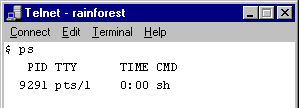
When you run a shell script, UNIX will create a new shell process with a new PID number. The following diagram shows a sample ps command and its output. In this example, the user is running only the Bourne shell (the
/bin/sh program), which is displayed as sh.
The next lesson describes how to start a new interactive shell.
